
BKB-SIN speech-in-noise test
In this quick guide, you will learn how to use the BKB-SIN speech-in-noise test provided with Interacoustics audiometers.
Getting started
- Activate your speech-in-noise license key to get access to the test through your audiometry module.
- Present the test via earphones or in a sound field with the attenuator dial set to 70 dB HL.
- For subjects with 3F PTA hearing losses greater than 45 dB HL, set the attenuator dial to a level that is "Loud, But OK."
- When testing in a sound field, have the patient speak into the talkback microphone so that responses are clearly audible to the tester.
- Instruct the patient to repeat the sentences spoken by the main talker and to ignore the background talkers.
- A verbal "ready" cue precedes each sentence.
Suggested presentation levels for standard SNR loss testing
| Patient group | Set dial to |
| Adult with normal hearing or mild loss | 70 dB HL* |
| Adult with 3F PTA > 45 dB HL | Loud, But OK |
| Child with normal hearing or mild loss | 50 to 70 dB HL |
| Child with 3F PTA > 45 dB HL | Loud, But OK |
| Patient aided with cochlear implant | 50 to 70 dB HL |
*At this level, the frequent peaks of the talker are at approximately 83 dB SPL for insert earphones, 85 dB SPL at 0 degrees azimuth in sound field, and 90 dB SPL with TOH earphones (ANSI S3.6 Specification for Audiometers, 1996).
Categories of loudness
| Category | Loudness |
| 7 | Uncomfortably Loud |
| 6 | Loud, But OK |
| 5 | Comfortable, But Slightly Loud |
| 4 | Comfortable |
| 3 | Comfortable, But Slightly Soft |
| 2 | Soft |
| 1 | Very Soft |
Scoring
- Both lists of a List Pair (A & B) must be administered for valid scoring.
- Present List A.
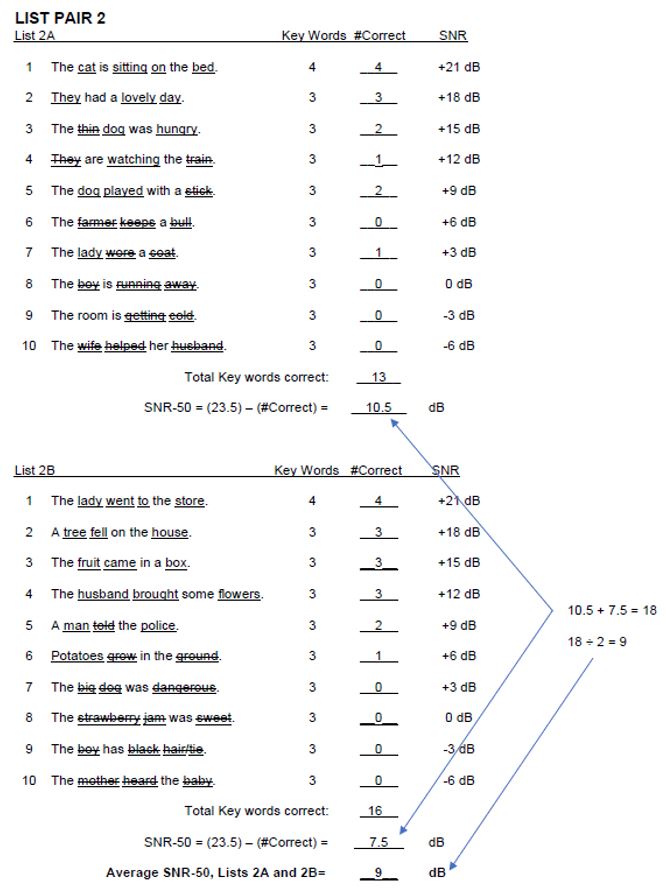
- Give one point for each underlined word repeated correctly.
- Add the number of correct words.
- Subtract the total correct from 23.5 (this is the SNR-50).
Repeat above steps for List B.
- Average the scores for A & B to obtain the List Pair Score.
Note: If administering more than one List Pair, average all List Pair scores. Compare score to test norms to calculate SNR Loss (see reverse).
Scoring example
BKB-SIN test norms in adults (List Pairs 1-8)
| Mean SNR-50 | Standard deviation | |
| Normal hearing adults | Minus 2.5 | 0.8 |
| Adults with cochlear implants | Compare to normal-hearing adult value to determine SNR loss | 1.6 |
BKB-SIN test norms in children (List Pairs 1-8)
| Mean SNR-50 | Standard deviation | |
| Children aged 5-6 | 3.5 | 2.0 |
| Children aged 7-10 | 0.8 | 1.2 |
| Children aged 11-14 | Minus 0.9 | 1.1 |
Calculate SNR loss
Subtract the test norm from the SNR-50 score. For example, if the SNR-50 is 9 dB, then the SNR loss would be calculated as follows:
| Patient group | Calculation | SNR loss |
| Adult | 9 minus (minus 2.5) | 11.5 dB |
| Children aged 5-6 | 9 minus 3.5 | 5.5 dB |
| Children aged 7-10 | 9 minus 0.8 | 8.2 dB |
| Children aged 11-14 | 9 minus (minus 0.9) | 9.9 dB |
Interpretation (adults)
| SNR loss | Degree of SNR loss | Expected improvement with directional microphones |
| 0-3 dB | Normal/near normal | May hear better than normal in noise |
| 3-7 dB | Mild SNR loss | May hear almost as well as normal in noise |
| 7-15 dB | Moderate SNR loss | Directional microphones would help Consider array microphone |
| >15 dB | Severe SNR loss | Maximum SNR improvement is needed Consider FM system |
Interpretation (children)
The effects of SNR loss are more pronounced for children than adults. Adults possess linguistic proficiency and world knowledge that facilitates speech perception, whereas children are in the process of acquiring linguistic and world knowledge through audition. Interpreting test results for children should be done a case-by-case basis.
Factors such as the student's speech, language and academic skills, as well as the learning environment (class size, acoustics properties of the room, and teaching style) should be considered. For example, a 5 dB SNR loss may have less impact on a child who has strong communicative and academic skills than one who is struggling in those areas.
Similarly, classroom environments that are instructionally and acoustically hospitable can sometimes reduce the adverse impact of the SNR loss. While those that are not may increase the impact of the SNR loss.
Learn more
To learn more about BKB-SIN testing, please read the BKB-SIN manual.
Presenter