How to Set Up Your Patient on the MotionVR with the VIVE Focus Vision VR Headset

By Cassie Anderson PT, DPT

This quick guide provides information on how to set up your patient on the MotionVR with the VIVE Focus Vision VR headset. Following the proper setup procedure can decrease the likelihood of motion pause or lock errors. In general, the patient should refrain from pressing buttons on the hand controllers or moving the VR headset once fitted.

1. Before your patient arrives, turn on the computer and MotionVR force plate.

2. Launch the VIVE Business Streaming and SteamVR applications.

3. Turn on the VR headset and hand controllers. When the connection between the laptop and VR headset is established, the three lines in the VIVE Business Streaming app will turn green.

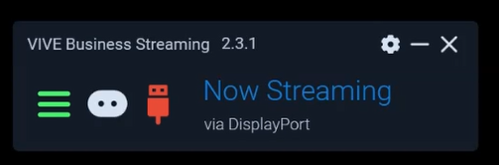
Wireless streaming option

Wired streaming option

4. Launch Virtualis Patient Manager 3.0 and open the intended module in your patient's profile.
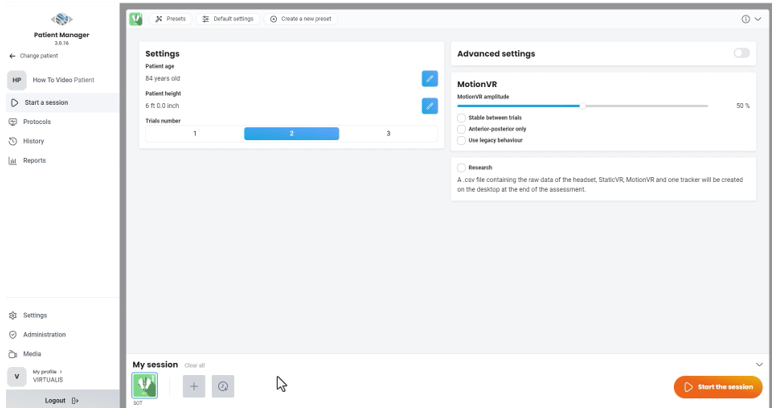
5. When your patient arrives, provide them with instructions on the intended module.

6. Assist the patient on the MotionVR force plate:

  • If you have the ring hardware option, position the ring at an appropriate height for your patient.
  • If you have the overhead harness option, fit the harness to the patient and secure the harness to the clips.

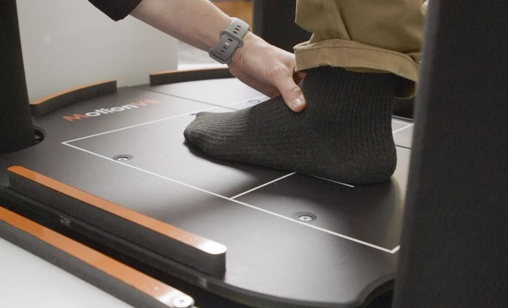
7. Center the patient's feet on the MotionVR force plate. The front edge of the medial malleolus of each foot should be directly centered on the horizontal line of the force platform. The outer edge of the foot should be aligned with the antero-posterior line corresponding to the patient's height (inner line: less than 55 inches; middle line: 56 to 65 inches; outer line: more than 65 inches).
8. Fit the VR headset to the patient. Instruct the patient not to adjust or remove the VR headset during the activity.
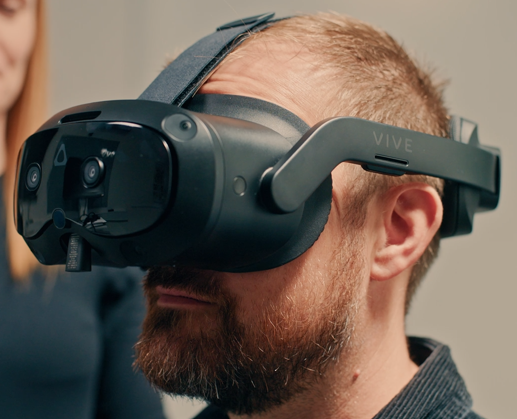
9. A prompt will be displayed inside the VR headset to complete the IPD adjustment. Instruct the patient to look at the blue dot.
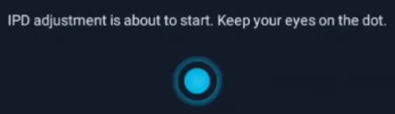
10. The patient will then see the Virtualis home screen inside the VR headset.

11. If controllers are needed for the module, position the straps around the patient's wrist and place the controllers in the patient's hand. Instruct the patient not to press any buttons on top of the controllers.
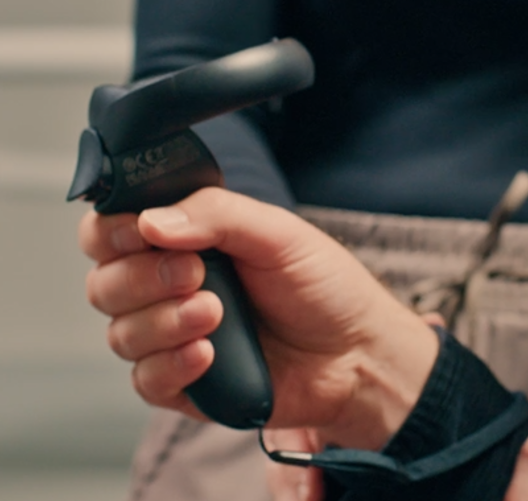
12. If controllers are not needed for the module, place them on the cart. Note: controllers must stay within the play boundary.

13. Launch the Virtualis module.

14. Once the patient is finished with the activity, exit the software module. The MotionVR force plate will return to the lowered position.

15. Remove the VR headset and accessories.

16. Assist the patient off the MotionVR force plate by either removing the harness or opening the ring.

Presenter

Cassie Anderson PT, DPT

Cassie Anderson PT, DPT

Global Clinical Educator for Balance Rehabilitation, Interacoustics A/S Cassie holds her Doctorate in Physical Therapy and has served as a licensed physical therapist for 11 years. She began her career in the inpatient rehab setting working primarily with patients post stroke then transitioned to the outpatient setting working primarily with the vestibular/balance population in a multidisciplinary ENT and neurology clinics. Cassie has participated in research and quality improvement projects aimed at incorporating technology into clinical practice and has presented at both the national and international level.

Available Training

How to swap the battery in your Virtualis VR headset

Learn how to swap the battery in your Virtualis VR headset and keep sessions flowing without interruption.

Interacoustics2026-10-28

How to set up your patient with the Virtualis VR headset

Learn how to set up and use your Virtualis VR headset so you are ready to start testing your patient.

Interacoustics2026-10-28

How to switch between streaming modes on the HTC Focus Vision VR headset

Learn how to switch between streaming modes on the HTC Focus Vision VR headset, used alongside the MotionVR Computerized Dynamic Posturography (CDP) system.

Cassie Anderson PT, DPT2026-10-28

How to set up your HTC Vive Focus Vision VR headset in the morning

Learn how to set up your HTC Vive Focus Vision VR headset in the morning, used alongside the Virtualis MotionVR CDP system. Read more.

Cassie Anderson PT, DPT2026-10-28

How to Reconfigure the HTC Vive Ultimate Trackers

Learn how to reconfigure the HTC Vive Ultimate Trackers, used alongside the Virtualis MotionVR Computerized Dynamic Posturography (CDP) system. Read more.

Cassie Anderson PT, DPT2026-10-28

How to reconfigure the room boundary: HTC Vive Focus Vision VR headset

Learn how to reconfigure the room boundary with the HTC Vive Focus Vision VR headset, used alongside the Virtualis MotionVR CDP system. Read more.

Cassie Anderson PT, DPT2026-10-28

How to navigate the menus in the HTC Vive Focus Vision VR Headset

Learn how to navigate the menus in the HTC Vive Focus Vision VR Headset, used with the Virtualis MotionVR Computerized Dynamic Posturography (CDP) system.

Cassie Anderson PT, DPT2026-10-28

How to Perform the Unilateral Stance Assessment Module

Learn how to perform the Unilateral Stance assessment module with the MotionVR Computerized Dynamic Posturography (CDP) machine.

Cassie Anderson PT, DPT2026-10-28

How to Perform the MatchingVR Module

Learn how to perform the MatchingVR module with the MotionVR Computerized Dynamic Posturography (CDP) machine.

Cassie Anderson PT, DPT2026-10-28

How to Perform the LOS Rehab Module

Learn how to perform the LOS Rehab module with the MotionVR Computerized Dynamic Posturography (CDP) machine.

Cassie Anderson PT, DPT2026-10-28

How to Perform the Sea Simulation Module

Learn how to perform the Sea Simulation module with the Virtualis MotionVR computerized dynamic posturography (CDP) system. Read more.

Cassie Anderson PT, DPT2026-10-28

How to Perform the Motion Program Module

Learn how to perform the Motion Program module with the MotionVR computerized dynamic posturography (CDP) system. Read more.

Cassie Anderson PT, DPT2026-10-28

How to Perform the BirdVR Module

Learn how to perform the BirdVR module with the Virtualis MotionVR computerized dynamic posturography (CDP) system. Read more.

Cassie Anderson PT, DPT2026-10-28

How to perform the Supermarket Scrolling module

Learn how to perform the Supermarket Scrolling module with the Virtualis MotionVR computerized dynamic posturography system. Read more.

Cassie Anderson PT, DPT2026-10-28

How to set the patient up with the Virtualis VR headset and accessories

In this video, you will learn how to set the patient up with the Virtualis VR headset and accessories. For use with MotionVR.

Interacoustics2026-10-28

How to prepare for testing and perform patient set-up with Virtualis MotionVR

In this video, you will learn how to set the patient up prepare for testing and perform patient set-up with the Virtualis MotionVR CDP system.

Interacoustics2026-10-28

Looking for clinical training?

Are you looking for more advanced and clinical training?