Stenger Test

By Interacoustics

What is the Stenger test?

The Stenger test is based on the auditory phenomenon "The Stenger Principle" and is used when a patient is suspected malingering a hearing loss. The Stenger Principle states that only the louder of two similar tones presented to both ears at the same time will be perceived. Generally, it is recommended only to perform the Stenger test in cases of unilateral hearing losses or significant asymmetries (at least 20dB).

Required equipment

  • Headphones or insert phones
  • A response button

How to perform the Stenger test
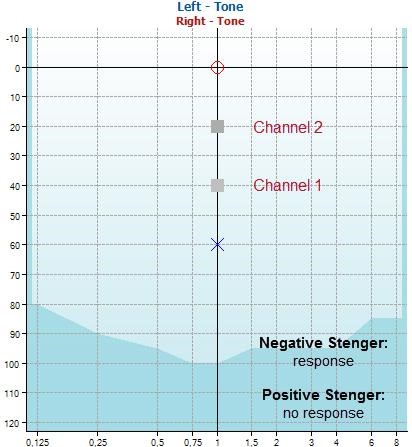
An image of a stenger test

  1. Press and hold the Tests button and use the scroll wheel to select Stenger. The Stenger test is as default set to present tones in both channel 1 and 2 simultaneously when pressing the tone switch of channel 1.
  2. Typically, the instruction to the patient is not different than with normal audiometry. The patient should not be informed that stimuli are presented at both ears simultaneously.
  3. Use Channel 2 for presenting tones to the better ear and set the intensity level to 10 or 20dB above the threshold (the example above shows 20dB).
  4. Use channel 1 for presenting tones to the poorer ear and set the intensity level 10 or 20dB below the level of the poor ear (the example above shows 40dB).
  5. Press the tone switch to present the tone on both channels. Keep the intensity level of the better ear fixed and increase the intensity for the worse ear in 5dB steps.

The speech Stenger test is identical, but with the use of speech material instead.

What is a negative Stenger test result?

If the hearing loss in the worse ear is genuine, the patient will keep responding to the signal presented to the better ear (negative Stenger).

What is a positive Stenger test result?

If the patient is simulating the hearing impairment, he will not respond to the stimuli, which shows that the tone presented in the poorer ear is better than what the individual indicates (positive Stenger).

Presenter

Interacoustics

Available Training

BKB-SIN speech-in-noise test

In this quick guide, you will learn how to use the BKB-SIN speech-in-noise test provided with the Interacoustics AD629 diagnostic audiometer. Read more.

Interacoustics2026-10-28

How to print without a database

Click here to learn about the three options you have for printing without a database with the AD629 diagnostic audiometer.

Interacoustics2026-10-28

Short Increment Sensitivity Index

Learn how to perform the short increment sensitivity index (SISI) test with the AD629 diagnostic audiometer.

Interacoustics2026-10-28

Audiometric Masking

Learn how to perform audiometric masking with the AD629 diagnostic audiometer.

Interacoustics2026-10-28

High Frequency Audiometry

Learn how to perform high frequency audiometry with the AD629 diagnostic audiometer.

Interacoustics2026-10-28

Békésy Audiometry

Learn how to perform the Békésy audiometry test with the AD629 diagnostic audiometer, including the Békésy audiometry types for results interpretation.

Interacoustics2026-10-28

Speech Audiometry

Learn how to perform speech audiometry with the AD629 diagnostic audiometer, including results interpretation.

Interacoustics2026-10-28

Pure Tone Audiometry

Learn how to perform pure tone audiometry with the AD629 diagnostic audiometer.

Interacoustics2026-10-28

Weber Test

Learn how to perform the Weber test with the AD629 diagnostic audiometer, including results interpretation.

Interacoustics2026-10-28

Alternate Binaural Loudness Balance Test

Learn how to perform the alternate binaural loudness balance (ABLB) test with the AD629 diagnostic audiometer, including results interpretation.

Interacoustics2026-10-28

Hughson-Westlake Procedure

Learn how to perform the Hughson-Westlake procedure with the AD629 diagnostic audiometer.

Interacoustics2026-10-28

Threshold Equalizing Noise (TEN) Test

Learn how to perform the threshold equalizing noise (TEN) test with the AD629 diagnostic audiometer, including results interpretation.

Interacoustics2026-10-28

Quick Speech in Noise (QuickSIN) with AD629

Learn how to perform the quick speech in noise (QuickSIN) test with the AD629 diagnostic audiometer, including results interpretation.

Interacoustics2022-02-11

Looking for clinical training?

Are you looking for more advanced and clinical training?