Creating an ABRIS Test Protocol

By Interacoustics

This quick guide outlines the procedure for creating a pass/refer ABRIS test protocol. Parameters and settings should be based on an appropriate pass/refer criterion.


  1. Open the Titan Suite software and click on the ABRIS tab.
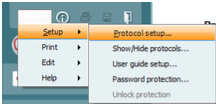
  2. Go to Menu | Setup | Protocol setup.
  3. Click on "New" and type the desired protocol name in the "Selected protocol" box.
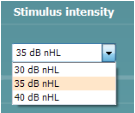
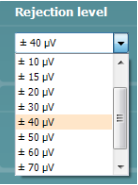
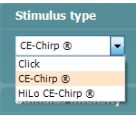
  4. Select the desired stimulus type, stimulus intensity and rejection level from the dropdown menus.
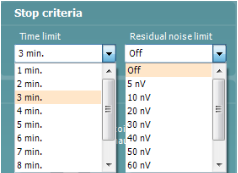
  5. Set the desired test stop criteria (test time and residual noise limit).
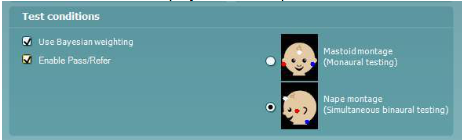
  6. Select the desired test conditions (electrode montage for us, turn Bayesian weighting on or off and Enable Pass/Refer to display result labels).
  7. Select the desired display options for the test results and EEG.

Note: Screen-shots in this document are a guide only and are not necessarily the recommended settings for an ABRIS pass/refer protocol. Refer to the Titan Additional Information document for a more detailed description of the various criteria.


Presenter

Interacoustics

Available Training

How to print without a database

Click here to learn about the three options you have for printing without a database with the Titan handheld tympanometer.

Interacoustics2026-10-28

How to clean the Titan probe tube

In this video, you will learn how to clean the Titan's probe tube.

Interacoustics2026-10-28

How to perform DPOAE on the Titan without using a PC

Learn how to perform handheld DPOAE with the Titan.

Interacoustics2026-10-28

How to perform TEOAE on the Titan without using a PC

Learn how to perform handheld TEOAE with the Titan.

Interacoustics2026-10-28

Mastoid Electrode Montage

Learn how to prepare the patient's skin and apply mastoid electrodes for automated ABR testing with the Titan.

Interacoustics2026-10-28

Best Practices for OAE Testing

Learn how to get the most out of your Titan for OAE testing.

Interacoustics2026-10-28

How to perform ABRIS on the Titan without using a PC

Learn how to perform handheld automated ABR with the Titan.

Interacoustics2026-10-28

Electrode Tips & Tricks

Learn how to get the most out of your electrodes for testing with the Titan.

Interacoustics2026-10-28

Selecting the Correct Ear Tip

Learn how to select the correct ear tip for testing with the Titan.

Interacoustics2026-10-28

Pressurized TEOAE

Learn how to perform pressurized transient evoked otoacoustic emission (TEOAE) testing with the handheld Titan tympanometer.

Interacoustics2026-10-28

Pressurized DPOAE

Learn how to perform pressurized distortion product otoacoustic emission (DPOAE) testing with the handheld Titan tympanometer.

Interacoustics2026-10-28

Nape Electrode Montage

Learn how to perform nape electrode montage.

Interacoustics2026-10-28

How to perform TEOAE on the Titan using a PC

Learn how to perform PC-based TEOAE with the Titan.

Interacoustics2026-10-28

How to Measure eSRT

Learn how to measure electrically evoked stapedial reflex thresholds (eSRTs) with the Titan.

Interacoustics2026-10-28

How to Change the Probe Tip

Learn how to change the Titan's probe tip.

Interacoustics2026-10-28

OAE Testing with PE Tubes

Learn how to perform OAE testing with PE-tubes using the Titan.

Interacoustics2026-10-28

Looking for clinical training?

Are you looking for more advanced and clinical training?