How to update software modules

By Cassie Anderson PT, DPT

This quick guide provides information on how to update the software modules in Patient Manager 3.0.

How to update software modules

Below, we will cover the following:

Requirements

To perform these updates, you will need:

  • Access to an internet connection
  • A current software maintenance contract

If you do not have access to the internet or a current software maintenance contract, please contact your local sales representative to assist you.

How to see if an update is available

When updates are available, you will see the following prompts:

  • An orange dot appears next to the settings tab on the left side of the screen.
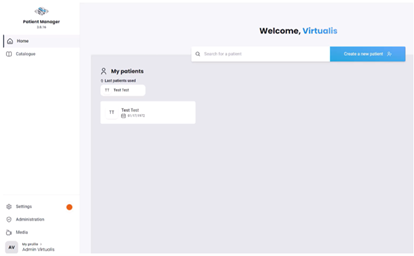
  • A banner appears at the bottom of the software module you are using that requires an update.

How to perform software updates

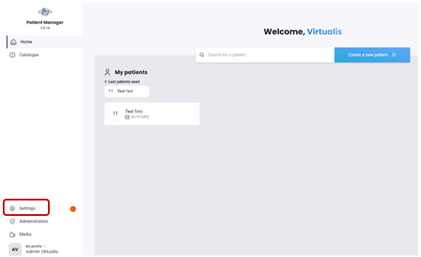
1. Click on the "Settings" tab on the left side of the home page.
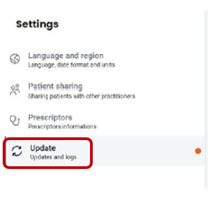
2. Next, click on the "Update" tab.
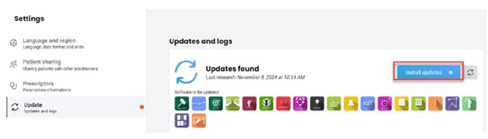
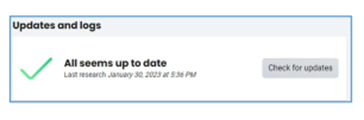
3. You will see a list of updates. When ready to perform the updates, click "Install updates." To avoid disrupting patient care, it is recommended to perform updates at the end of the clinic day.
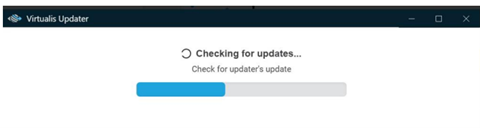
4. The Virtualis Updater will launch.
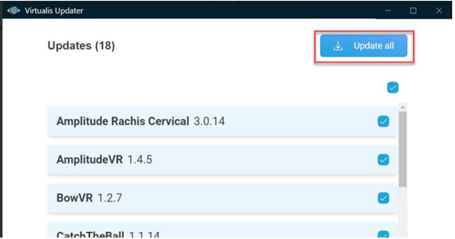
5. Select the individual updates you want to install or click "Update all" to install everything at once.
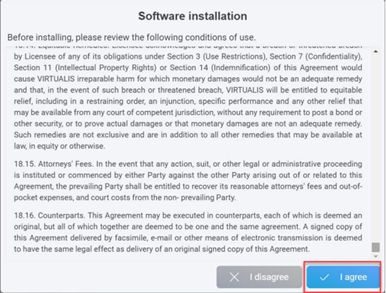
6. Read conditions of use, then click "I agree" to continue.
7. Updates will begin to install.
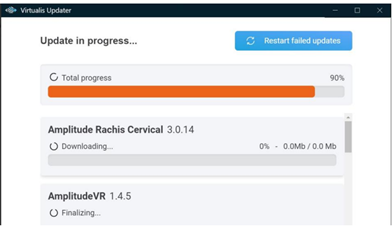
8. Once updates are completed, your system is now up to date.
Presenter

Cassie Anderson PT, DPT

Cassie Anderson PT, DPT

Global Clinical Educator for Balance Rehabilitation, Interacoustics A/S Cassie holds her Doctorate in Physical Therapy and has served as a licensed physical therapist for 11 years. She began her career in the inpatient rehab setting working primarily with patients post stroke then transitioned to the outpatient setting working primarily with the vestibular/balance population in a multidisciplinary ENT and neurology clinics. Cassie has participated in research and quality improvement projects aimed at incorporating technology into clinical practice and has presented at both the national and international level.

Available Training

How to Perform the SkiVR Module

Learn how to perform the SkiVR module with the Virtualis MotionVR computerized dynamic posturography (CDP) system. Read more.

Cassie Anderson PT, DPT2026-11-05

How to swap the battery in your Virtualis VR headset

Learn how to swap the battery in your Virtualis VR headset and keep sessions flowing without interruption.

Interacoustics2026-10-28

How to set up your patient with the Virtualis VR headset

Learn how to set up and use your Virtualis VR headset so you are ready to start testing your patient.

Interacoustics2026-10-28

How to switch between streaming modes on the HTC Focus Vision VR headset

Learn how to switch between streaming modes on the HTC Focus Vision VR headset, used alongside the MotionVR Computerized Dynamic Posturography (CDP) system.

Cassie Anderson PT, DPT2026-10-28

How to set up your HTC Vive Focus Vision VR headset in the morning

Learn how to set up your HTC Vive Focus Vision VR headset in the morning, used alongside the Virtualis MotionVR CDP system. Read more.

Cassie Anderson PT, DPT2026-10-28

How to Reconfigure the HTC Vive Ultimate Trackers

Learn how to reconfigure the HTC Vive Ultimate Trackers, used alongside the Virtualis MotionVR Computerized Dynamic Posturography (CDP) system. Read more.

Cassie Anderson PT, DPT2026-10-28

How to reconfigure the room boundary: HTC Vive Focus Vision VR headset

Learn how to reconfigure the room boundary with the HTC Vive Focus Vision VR headset, used alongside the Virtualis MotionVR CDP system. Read more.

Cassie Anderson PT, DPT2026-10-28

How to Set Up Your Patient on the MotionVR with the VIVE Focus Vision VR Headset

Learn how to set up your patient on the Virtualis MotionVR Computerized Dynamic Posturography (CDP) system with the HTC Vive Focus Vision VR Headset. Read more.

Cassie Anderson PT, DPT2026-10-28

How to navigate the menus in the HTC Vive Focus Vision VR Headset

Learn how to navigate the menus in the HTC Vive Focus Vision VR Headset, used with the Virtualis MotionVR Computerized Dynamic Posturography (CDP) system.

Cassie Anderson PT, DPT2026-10-28

How to set the patient up with the Virtualis VR headset and accessories

In this video, you will learn how to set the patient up with the Virtualis VR headset and accessories. For use with MotionVR.

Interacoustics2026-10-28

How to prepare for testing and perform patient set-up with Virtualis MotionVR

In this video, you will learn how to set the patient up prepare for testing and perform patient set-up with the Virtualis MotionVR CDP system.

Interacoustics2026-10-28

How to perform a room setup

This quick guide provides information on how to complete a room setup in the SteamVR application for the HTC Vive Pro 2 VR headset. For use with the MotionVR.

Cassie Anderson PT, DPT2026-10-28

How to set up profiles

This quick guide provides information on setting up practitioner and patient profiles and creating a prescriber in the Virtualis MotionVR system. Read more.

Cassie Anderson PT, DPT2026-10-28

How to navigate the software modules

This quick guide provides information on how to view and navigate the software modules in the Virtualis MotionVR system.

Cassie Anderson PT, DPT2026-10-28

How to create a report

This quick guide provides information on viewing patient results, creating a patient report, and exporting the report to a PDF with the Virtualis MotionVR.

Cassie Anderson PT, DPT2026-10-28

How to create a protocol

This quick guide provides information on creating a protocol under a patient profile in the Virtualis MotionVR system.

Cassie Anderson PT, DPT2026-10-28

Looking for clinical training?

Are you looking for more advanced and clinical training?