How to perform QuickSIN with Equinox Evo

By Interacoustics

Difficulty with hearing in background noise is a common complaint among hearing aid users. Therefore, the measurement of SNR loss (signal-to-noise ratio loss) is important because a person's ability to understand speech in noise cannot be reliably predicted from the pure tone audiogram.

The QuickSIN test was developed to provide a quick estimate of SNR loss. A list of six sentences with five key words per sentence is presented in four-talker babble noise. The sentences are presented at pre-recorded SNR ratios which decrease in 5-dB steps from 25 (very easy) to 0 (extremely difficult).

The SNRs used are: 25, 20, 15, 10, 5 and 0, encompassing normal to severely impaired performance in noise.

Required equipment

  • Equinox Evo
  • Licensed AC440 Audiometry module
  • Calibrated headphones, insert phones or free-field speakers

Test procedure
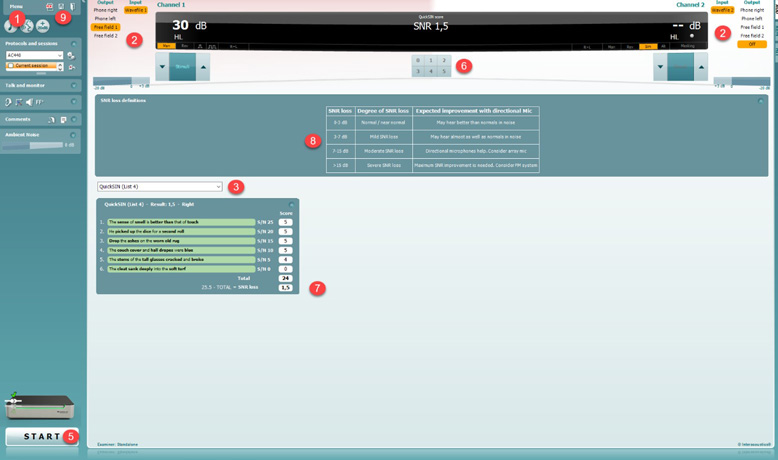
The test screen displays many items. The main items are output and input selection for channels 1 and 2, stimuli level increase or decrease for channels 1 and 2, stimuli presentation for channels 1 and 2, QuickSIN scoring as in words correct from 0 to 5, SNR loss definitions, word list selection, and the QuickSIN results.
Figure 1: QuickSIN test screen. Numbers 1 to 9 on the test screen correspond to steps 1 to 9 below.

  1. Open the AC440 module and enter the QuickSIN screen by selecting Menu | Tests | QuickSIN.
  2. Select the output level. For most of the tracks, the channels are synchronised to ensure that the correct SNR level is achieved. Note: the 'Speech and Babble' lists are not synchronised and will require the user to manually alter these to ensure the correct SNR setting for the test.
  3. Select a list in the dropdown.
  4. Instruct the patient to repeat the sentences and try to ignore the noise that they will also hear through the headphones.
  5. Press START to begin the test.
  6. The number of words in bold the patient repeats correctly should be scored by clicking on the score buttons.
  7. When 6 sentences are scored, a total score will be calculated. Note that if you press Stop before the 6 sentences of the list have been played and scored, no total score will be calculated.
  8. The total score can be compared to the 'SNR loss definitions'.
  9. Save the QuickSIN test by clicking Save.

QuickSIN results
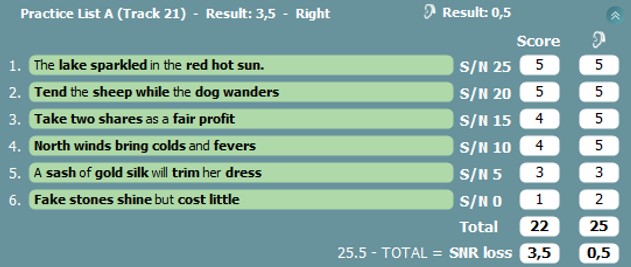
Six sentences with five words in bold that the clinician scores based on correct or incorrect responses. The SNR ratio decreases from 25 dB in sentence one to 0 dB in sentence six in 5-dB steps.
Figure 2: QuickSIN results. The total score is 22, which gives a SNR loss of 3.5, meaning this patient has a mild SNR loss.

The SNR loss is 25.5 minus the total score. The total score is a sum of the score for each sentence (Figure 2). The SNR loss is then categorized based on the definition seen in the table in the test screen (Figure 1).

For more details on how to perform the QuickSIN test, please read the QuickSIN manual.

Presenter

Interacoustics

Available Training

Equinox Evo: How to set up the assistant monitor

Learn how to set up the assistant monitor functionality using the Equinox Suite software with the Equinox Evo clinical audiometer.

Interacoustics2026-10-28

Equinox Suite: How to use the VRA feature

Learn how to use the visual reinforcement audiometry (VRA) feature in the Equinox Suite software with the Equinox Evo clinical audiometer.

Interacoustics2026-10-28

Equinox Suite: How to set up your VRA

Learn how to set up your visual reinforcement audiometry (VRA) using the Equinox Suite software with the Equinox Evo clinical audiometer.

Interacoustics2026-10-28

How to perform the Weber test with Equinox Evo

Click here to learn how to perform the Weber test with the Equinox Evo clinical audiometer.

Interacoustics2026-10-28

How to perform the tone decay test with Equinox Evo

Click here to learn how to perform the tone decay test with the Equinox Evo clinical audiometer.

Interacoustics2026-10-28

How to use VRA ticksheets and conditioning with Equinox Evo

Click here to learn how to use VRA ticksheets and conditioning with the Equinox Evo clinical audiometer.

Interacoustics2026-10-28

How to perform the TEN test with Equinox Evo

Click here to learn how to perform the TEN test with the Equinox Evo clinical audiometer.

Interacoustics2026-10-28

How to perform the Stenger test with Equinox Evo

Click here to learn how to perform the Stenger test with the Equinox Evo clinical audiometer.

Interacoustics2026-10-28

How to perform the Short Increment Sensitivity Index (SISI) test with Equinox Evo

Click here to learn how to perform the short increment sensitivity index (SISI) test with the Equinox Evo clinical audiometer.

Interacoustics2026-10-28

How to perform the Speech in Quiet (SIQ) test with Equinox Evo

Click here to learn how to perform the speech in quiet (SIQ) test with the Equinox Evo clinical audiometer.

Interacoustics2026-10-28

How to perform the Speech in Noise (SIN) test with Equinox Evo

Click here to learn how to perform the speech in noise (SIN) test with the Equinox Evo clinical audiometer.

Interacoustics2026-10-28

How to use quality assurance indicators with Equinox Evo

Click here to learn how to use quality assurance indicators with the Equinox Evo clinical audiometer.

Interacoustics2026-10-28

How to perform pure tone audiometry with Equinox Evo

Click here to learn how to perform pure tone audiometry with the Equinox Evo clinical audiometer.

Interacoustics2026-10-28

How to use pediatric noise with Equinox Evo

Learn how to use the pediatric noise stimulus with the Equinox Evo clinical audiometer.

Interacoustics2026-10-28

How to perform Masking Level Difference (MLD) with Equinox Evo

Learn how to perform the masking level difference (MLD) test with the Equinox Evo clinical audiometer.

Interacoustics2026-10-28

How to perform audiometric masking with Equinox Evo

Learn how to perform audiometric masking with the Equinox Evo clinical audiometer.

Interacoustics2026-10-28

Looking for clinical training?

Are you looking for more advanced and clinical training?