Types of decibels in audiology

By Interacoustics

In the field of audiology, we are often presented with different quantities expressed in units of 'decibel'. This brief guide offers you an overview on the most important details to know about the decibel.

What is a decibel?

The decibel (dB) takes its name from Alexander Graham Bell, the inventor of the telephone. The dB (a 10th of a Bel) was derived from the attenuation of a signal transmitted along a mile of telephone cable. The dB was linked with audiology from the beginning because this mile of attenuation was considered the smallest amount of signal change that the average listener could detect.

Decibel suffixes

In audiology, many different suffixes are appended to the unit of the dB. The most used are dB SPL and dB HL (Figure 1).
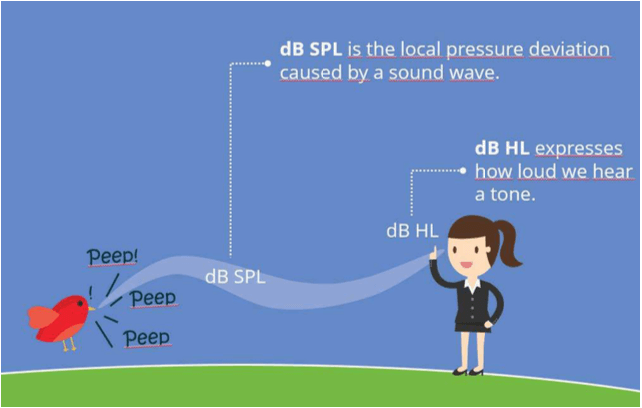
In this example, a girl can hear a bird peeping. dB SPL is the local pressure deviation caused by a sound wave, thus the actual sound pressure level of the bird's peep. dB HL is the intensity at which we can hear the sound, allowing the girl to hear the bird's peep.

Figure 1: Difference between dB SPL and dB HL.

Sound Pressure Level (SPL)

dB SPL is the measured pressure relative to 20 micropascals. This 20-micropascal reference was selected because it was the quietest sound pressure level that a group of normal hearing test subjects could detect. dB SPL is an absolute and frequency-independent unit.

It is the unit most often used in the calibration of signals in hearing testing equipment. All other suffixes used in acoustics to describe loudness are calculated from the SPL value.

Hearing Level (HL)

dB HL refers to the hearing ability of a person and gives a statement about the severity of the hearing loss. Hearing levels are measured with pure tones at different frequencies and the hearing level of an individual will vary depending on the frequency chosen.

Normal hearing is defined as 0 dB HL. If a person has a hearing loss of 60 dB HL at 1 kHz, then he or she cannot hear a pure tone that is presented below 60 dB HL.

Normalized HL (nHL)

The notation of nHL is a reference to the frequency-specific threshold of normal hearing subjects. It describes the intensity level of stimuli used in the field of electrophysiology (ABR, ASSR, and so forth). We use a correction factor added on top of the SPL value to calculate the nHL value.

Presenter

Interacoustics

Available Training

How to prepare the patient for ECochG testing

Learn how to prepare your patient for ECochG testing using the Eclipse. This video covers electrode montage, the test procedure, and more. Watch the video here.

Interacoustics2026-10-28

How to prepare the patient for threshold cortical testing

Learn how to set up and prepare your patient for threshold cortical testing. This video shows the recommended electrode montage and an alternative montage.

Interacoustics2026-10-28

How to prepare the patient for ABR and ASSR testing

Learn how to set up and prepare your patient for ABR and ASSR testing on the Eclipse. This video shows the electrode montage, the impedance check, and more.

Interacoustics2026-10-28

How to prepare the patient for cVEMP testing

Learn how to set up and prepare your patient for the cervical VEMP test procedure on the Eclipse. Includes patient instructions, electrode montage, and more.

Interacoustics2026-10-28

How to prepare the patient for oVEMP testing

Learn how to set up and prepare for the Ocular VEMP test procedure with the Eclipse. You will learn how to mount the electrodes and check impedances. Watch now.

Interacoustics2026-10-28

How to navigate the test screen

In this short, 2-minute video, you'll learn how to navigate the Eclipse software's test screen and access the most important options. Watch the video here.

Interacoustics2026-10-28

How to use the edit tab

Learn how to use the edit tab in the Interacoustics Eclipse software.

Interacoustics2026-10-28

How to use the top panel

Learn how to use the top panel in the Interacoustics Eclipse software.

Interacoustics2026-10-28

How to use the recording tab

Learn how to use the recording tab in the Interacoustics Eclipse software.

Interacoustics2026-10-28

How to use the latency tab

Learn how to use the latency tab in the Interacoustics Eclipse software.

Interacoustics2026-10-28

How to customize your ABR protocol

Learn how to customize your auditory brainstem response (ABR) protocol with the Interacoustics Eclipse.

Interacoustics2026-10-28

How to print a report

Learn how to print a report with the Interacoustics Eclipse.

Interacoustics2026-10-28

How to add a new patient in OtoAccess ® Database

Learn how to add a new patient in OtoAccess Database before testing with your Interacoustics Eclipse.

Interacoustics2026-10-28

How to make changes to a saved session

Learn how to make changes to a saved session with the Interacoustics Eclipse.

Interacoustics2026-10-28

How to mark ABR waveforms

Learn how to how to mark auditory brainstem response (ABR) waveforms with the Interacoustics Eclipse.

Interacoustics2026-10-28

Basic ABR Testing

Learn how to perform auditory brainstem response (ABR) testing with the Eclipse device.

Rasmus Skipper, MSc Audiology2026-10-28

Looking for clinical training?

Are you looking for more advanced and clinical training?