Mounting the Eartip Adaptor

By Interacoustics
  1. Remove the nipple from the insert phone tubing.
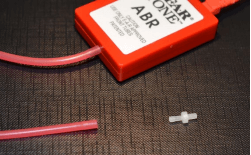
  2. Mount the eartip adaptor ensuring it is inserted into the tubing completely. Place an eartip on the adaptor before use.
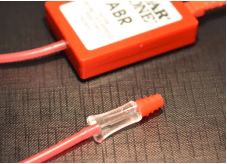
  3. Ensure that the eartip adaptor is not blocked with vernix or cerumen after use. For cleaning, follow the instructions below.

Cleaning the eartip adaptor

  1. Unplug the eartip adaptor from the insert phone tubing and use the cleaning floss that comes with the adaptor kit (8003566).
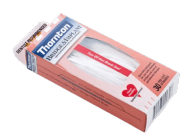
  2. Thread the stiff end of the cleaning floss into the eartip adaptor tube from the back. Now pull the cleaning floss completely through tube. Repeat if necessary.
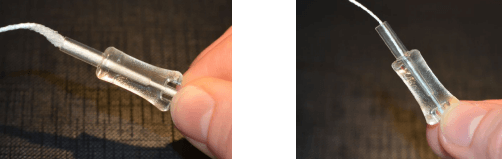
    If the adaptor is severely contaminated with cerumen or vernix, replace the adaptor with a new one (part no. 8500580) to ensure correct usage.

Presenter

Interacoustics

Available Training

How to prepare the patient for ECochG testing

Learn how to prepare your patient for ECochG testing using the Eclipse. This video covers electrode montage, the test procedure, and more. Watch the video here.

Interacoustics2026-10-28

How to prepare the patient for threshold cortical testing

Learn how to set up and prepare your patient for threshold cortical testing. This video shows the recommended electrode montage and an alternative montage.

Interacoustics2026-10-28

How to prepare the patient for ABR and ASSR testing

Learn how to set up and prepare your patient for ABR and ASSR testing on the Eclipse. This video shows the electrode montage, the impedance check, and more.

Interacoustics2026-10-28

How to prepare the patient for cVEMP testing

Learn how to set up and prepare your patient for the cervical VEMP test procedure on the Eclipse. Includes patient instructions, electrode montage, and more.

Interacoustics2026-10-28

How to prepare the patient for oVEMP testing

Learn how to set up and prepare for the Ocular VEMP test procedure with the Eclipse. You will learn how to mount the electrodes and check impedances. Watch now.

Interacoustics2026-10-28

How to navigate the test screen

In this short, 2-minute video, you'll learn how to navigate the Eclipse software's test screen and access the most important options. Watch the video here.

Interacoustics2026-10-28

How to use the edit tab

Learn how to use the edit tab in the Interacoustics Eclipse software.

Interacoustics2026-10-28

How to use the top panel

Learn how to use the top panel in the Interacoustics Eclipse software.

Interacoustics2026-10-28

How to use the recording tab

Learn how to use the recording tab in the Interacoustics Eclipse software.

Interacoustics2026-10-28

How to use the latency tab

Learn how to use the latency tab in the Interacoustics Eclipse software.

Interacoustics2026-10-28

How to customize your ABR protocol

Learn how to customize your auditory brainstem response (ABR) protocol with the Interacoustics Eclipse.

Interacoustics2026-10-28

How to print a report

Learn how to print a report with the Interacoustics Eclipse.

Interacoustics2026-10-28

How to add a new patient in OtoAccess ® Database

Learn how to add a new patient in OtoAccess Database before testing with your Interacoustics Eclipse.

Interacoustics2026-10-28

How to make changes to a saved session

Learn how to make changes to a saved session with the Interacoustics Eclipse.

Interacoustics2026-10-28

How to mark ABR waveforms

Learn how to how to mark auditory brainstem response (ABR) waveforms with the Interacoustics Eclipse.

Interacoustics2026-10-28

Types of decibels in audiology

In this brief introduction to the decibel, you'll learn about its origin and the many suffixes appended to it in audiology. Read more about the decibel here.

Interacoustics2026-10-28

Looking for clinical training?

Are you looking for more advanced and clinical training?