
Middle Latency Response (MLR)
What are middle-latency responses (MLRs)?
Middle-latency responses (MLRs) are related to auditory generators of the subcortical regions Na and Pa components at cortical levels. Na is considered the onset of the MLR and Pa is considered the most robust component of the MLR.
Why measure MLRs?
MLR has the potential to offer a more complete picture of the status of the auditory system and can be used to help determine the degree of hearing loss. The most common neurological use of the MLR is for the assessment of the functional integrity of the auditory pathway above the level of the brainstem in cases with suspected lesions and for the assessment of nonorganic hearing loss.
Further, MLR is used in instances of traumatic brain injury, cortical deafness, multiple sclerosis, and cases of central auditory processing disorders.
Young children and infants may not present MLR even when their auditory and neurological functions are intact, because of their higher sensitivity to stimulus rate. In general MLR from children younger than 10 years should be interpreted with caution. It is also important to note that prior to the level of interest the auditory function should be examined and working normally, if not this will affect the MLR results.
The stimuli used for MLR is similar to the traditional ABR octave wide stimuli.
How to measure MLRs
Patient preparation
The patient is instructed to relax and informed about the test procedure prior to testing. MLRs are most reliable when the patient is awake and quiet.
During sedation - as with natural sleep - the MLR response is not affected.
Electrode placement
It is possible to obtain MLR with a standard ABR electrode montage. Due to the latency of the MLR measurement, it is important to pay attention to the PAM muscle artifact, so it is not misinterpreted as an MLR.
To minimize the influence of the PAM muscle, ensure that the patient is calm and relaxed and place the electrodes on the earlobe rather than on the mastoid.
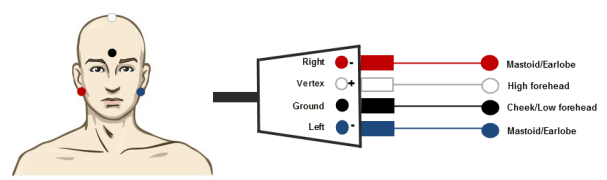
Setting up the Eclipse
The Eclipse comes with a pre-programmed protocol for MLR testing (license) and is ready to use immediately. Protocols can be created or modified easily to fit your clinic needs. Consult your Eclipse Additional Information to learn how to create or modify a protocol.
Protocol settings
- An MLR should be measured using traditional ABR stimuli, such as Toneburst 250-4000 Hz, stimuli from the CE-Chirp® LS family or custom wave files at a moderate intensity level
- For neuro diagnosis, a moderate stimuli intensity below 70 dB nHL is appropriate
- For threshold estimation, present stimuli levels as done with traditional ABR threshold testing
- A slower rate is indicated for younger children or for patients with cortical pathology. Normal rate for adults is below 7.1 stimuli per second
- Stimuli rates as low as 1 per second or 0.5 per second are required to consistently record the Pb component
Interpretation of the MLR result
The MLR latency ranges from 15-80 ms and amplitude sizes ranges from 0-2 uV.
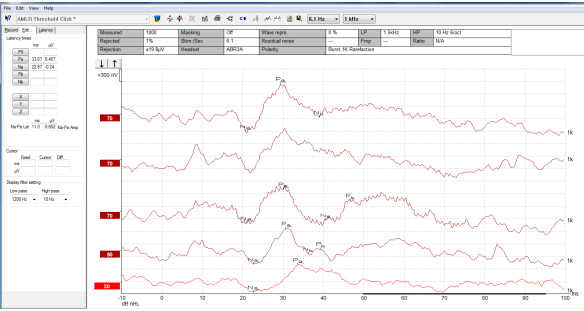
An MLR threshold recording here using 1 kHz tone burst for threshold evaluation.
Cochlear implants
The longer latencies of the MLR separate them from the cochlear implant stimuli artifacts seen under the traditional eABR. Therefore, MLRs may be used to assess the efficacy of cochlear implants in activating the auditory pathway.
Reporting
Choose the Report Icon 
When complete, choose Save and Exit.
References
Atcherson, S.R. & Kennett, S.W. (2013), Applications of middle and late latency responses, ENT & Audiology news (20)4.
Roeser, R.J., Valente, M., Hosford-Dunn, H. (2007). Audiology Diagnosis, Theime 2nd ed.
Presenter