IA OAE Suite TEOAE

By Interacoustics

Prepare the equipment

  1. Connect and ensure the device is on.
  2. Open the OtoAccess or Noah database and enter new patient details.
  3. Double click on the IA OAE Suite icon to launch the software and click on the TEOAE module tab.
  4. Select the desired test protocol from the dropdown list.
  5. Select the ear for testing.

Test environment

The ideal test environment is a quiet room. High ambient background noise adversely affects OAE measurements.

Prepare the patient

The patient should be sleeping or in quiet relaxed state. Sucking, blinking, crying or movement may affect testing.

Place transducer

Place the probe in the ear and secure the cable with the clothing clip.
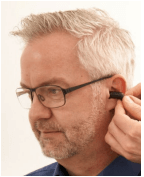


The probe status in the software will turn green to indicate a good seal. It willturn red when an insufficient seal is present, e.g., out of ear.

Run test

Click on START in the software or press the spacebar on the keyboard.

Diagnostic results
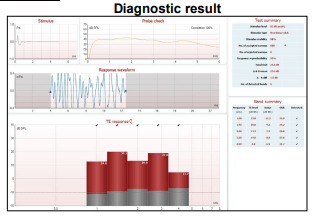
The Stimulus graph displays the click stimulus.

The Probe Check graph provides a graphical display of the probe fit (this example is from the Lyra)

The Response Waveform graph displays the OAE response in the time domain along with the recording window.

The TE response graph displays the TEOAE response (red for right ear) and noise floor (grey) in half octave bands. When the TEOAE SNR criteria is reached, checkmarks will appear above the bands.

Numerical test information is displayed in the Test and Band Summary tables.

Screening results
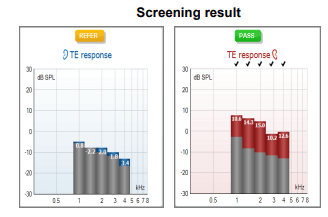
PASS is displayed when the criteria for a pass is reached.

REFER is displayed when the criteria for a pass is not reached within the measurement time.

INCOMPLETE is displayed if the test is stopped before a PASS or REFER can be determined by the detection algorithm

Presenter
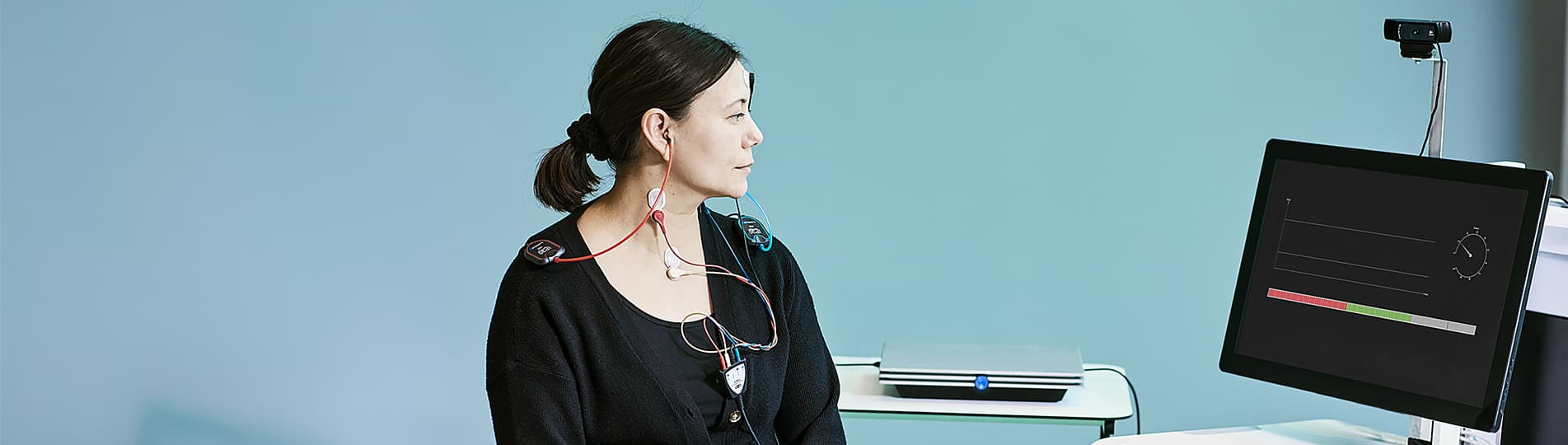
Interacoustics

Available Training

Cochlear Microphonics

Learn how to measure cochlear microphonics with the Eclipse device.

Rasmus Skipper, MSc Audiology2026-10-28

oVEMP Testing

Learn how to perform ocular vestibular-evoked myogenic (oVEMP) testing with the Eclipse device.

Rasmus Skipper, MSc Audiology2026-10-28

Eclipse Onboarding Resource

This resource is designed to give you a thorough understanding of the Eclipse, so you can get up and running quickly and make the best possible measurements.

Leigh Martin2026-10-02

How to prepare the patient for ECochG testing

Learn how to prepare your patient for ECochG testing using the Eclipse. This video covers electrode montage, the test procedure, and more. Watch the video here.

Interacoustics2026-10-02

How to prepare the patient for threshold cortical testing

Learn how to set up and prepare your patient for threshold cortical testing. This video shows the recommended electrode montage and an alternative montage.

Interacoustics2026-10-02

How to prepare the patient for ABR and ASSR testing

Learn how to set up and prepare your patient for ABR and ASSR testing on the Eclipse. This video shows the electrode montage, the impedance check, and more.

Interacoustics2026-10-02

How to prepare the patient for cVEMP testing

Learn how to set up and prepare your patient for the cervical VEMP test procedure on the Eclipse. Includes patient instructions, electrode montage, and more.

Interacoustics2026-10-02

How to prepare the patient for oVEMP testing

Learn how to set up and prepare for the Ocular VEMP test procedure with the Eclipse. You will learn how to mount the electrodes and check impedances. Watch now.

Interacoustics2026-10-02

How to navigate the test screen

In this short, 2-minute video, you'll learn how to navigate the Eclipse software's test screen and access the most important options. Watch the video here.

Interacoustics2026-10-02

How to use the edit tab

Learn how to use the edit tab in the Interacoustics Eclipse software.

Interacoustics2026-10-02

How to use the top panel

Learn how to use the top panel in the Interacoustics Eclipse software.

Interacoustics2026-10-02

How to use the recording tab

Learn how to use the recording tab in the Interacoustics Eclipse software.

Interacoustics2026-10-02

How to use the latency tab

Learn how to use the latency tab in the Interacoustics Eclipse software.

Interacoustics2026-10-02

How to customize your ABR protocol

Learn how to customize your auditory brainstem response (ABR) protocol with the Interacoustics Eclipse.

Interacoustics2026-10-02

How to print a report

Learn how to print a report with the Interacoustics Eclipse.

Interacoustics2026-10-02

How to add a new patient in OtoAccess ® Database

Learn how to add a new patient in OtoAccess Database before testing with your Interacoustics Eclipse.

Interacoustics2026-10-02

Looking for clinical training?

Are you looking for more advanced and clinical training?