HIT440 Protocol Setup

By Interacoustics

The Affinity Suite has pre-defined protocols. Most of these protocols can easily be copied, modified or created from new. These modifications can be either permanent or temporary.

Working with protocols

1. Selecting a standard test protocol

  1. Open the Affinity Suite from Noah, OtoAccess®, or stand-alone.
  2. Click on the HIT tab.
  3. In the List of Protocols, all customized and standard test protocols are listed
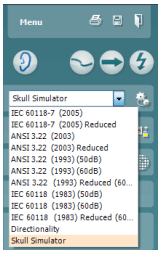
2. Designing a new customized test protocol

  1. Enter the HIT440 setup by pressing Menu/Setup/HIT440 setup.
  2. Press New. A pop-up will ask whether the new test protocol should be based on a copy of the currently selected test protocol. When asked by the message box:

    YES: The system will create a copy of the current test and allow you to add new tests, make changes, and save it under a new name.
    NO: The Selected tests section will be blank and you can create a new test from scratch.
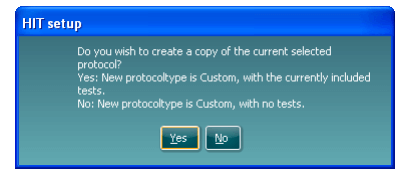
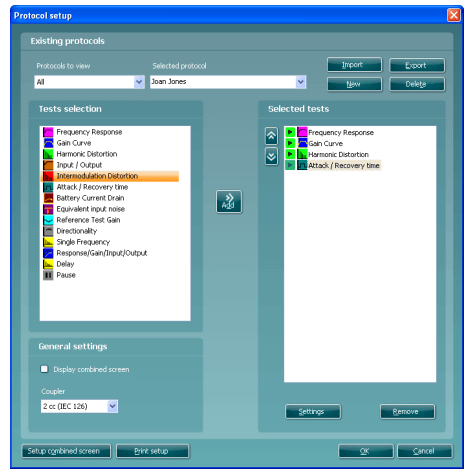
  3. Name the test protocol setup in the Selected protocol section.
  4. Select the tests to be included in the test protocol. Mark a test by clicking on it and press the Add. Double
    clicking on a test will also select it. Choose all the tests for the test protocol using this procedure.
  5. To remove a test selected by mistake, select it under Selected tests and press Remove. The test will then
    jump back to the Test selection list.
  6. If the order of the tests is to be changed, use the two Move arrow buttons.
    Mark the test to be moved and press one of the arrow buttons. Depending on the direction of the selected
    arrow, the test will then jump up or down.
  7. To make adjustments to the parameters of each selected test press Settings.
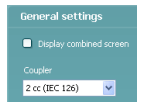
  8. In General settings find the following additional options:

    Display combined screen allows for comparing different curves by default in the same graph. The option is also available from the front screen. Which curves to compare can be setup individually.

    Coupler allows you to select the preferred coupler to be used in the test protocol.
    Select from 0.6 cc, 1.2 cc, 2 cc, and Ear simulator (IEC 711)
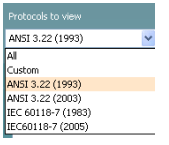
    Note: Prior to creating a new test protocol you may wish to select a protocol type in the Protocols to view dropdown list. This function is practical if you for example wish to create a new protocol based on elements from the ANSI or IEC standard.

    In this case the dropdown list can be used to select an ANSI or IEC standard before clicking New. When asked if the new protocol should be based on a copy of the currently selected protocol, click yes.
Presenter

Interacoustics

Available Training

AC440 Protocol Setup

Learn how to set up protocols in the Affinity Compact's audiometry module.

Interacoustics2026-10-28

How to perform FM transparency verification

In this Affinity Compact quick guide, you'll learn how to perform FM transparency verification. Read more.

Interacoustics2026-10-28

How to perform frequency lowering verification

In this Affinity Compact quick guide, you'll learn how to determine if you should apply frequency lowering and how to verify the frequency lowering feature.

Interacoustics2026-10-28

BKB-SIN speech-in-noise test

In this quick guide, you will learn how to use the BKB-SIN speech-in-noise test provided with the Interacoustics Affinity Compact audiometer. Read more.

Interacoustics2026-10-28

Unboxing Affinity Compact

In this unboxing video, you'll see the various hardware included when purchasing the Affinity Compact from Interacoustics. Click here to watch the video.

Alan Thaastrup Mikkelsen2026-10-28

Performing an RECD Measurement

Learn how to perform coupler fittings with the Affinity Compact.

Dennis Mistry2026-10-28

How to Perform Real-Ear Measurements

Learn how to perform real-ear measurements with the Affinity Compact.

Dennis Mistry2026-10-28

Affinity Compact: Features and functions

This video provides an overview of the Affinity Compact's features and functions.

Dennis Mistry2026-10-28

Affinity Compact: A product introduction

This video provides an introduction to and overview of the Affinity Compact.

Interacoustics2026-10-28

How to Use Affinity Compact's Probe Placement Indicator

Learn how to use Affinity Compact's Probe Placement Indicator in this short, step-by-step guide. Read the guide here.

Rasna Kaur Mistry, BSc (Hons) Audiology2026-10-28

Customized Printout Setup

Learn how to customize printouts with the Affinity Compact.

Interacoustics2026-10-28

Real-Ear-to-Coupler Difference

Learn how to measure the real-ear-to-coupler difference (RECD) with the Affinity Compact.

Interacoustics2026-10-28

QuickSIN Test

Learn how to perform the quick speech in noise (QuickSIN) test with the Affinity Compact.

Interacoustics2026-10-28

TEN Test in AC440

Learn how to perform the threshold equalizing noise (TEN) test with the Affinity Compact.

Interacoustics2026-10-28

REM440 Protocol Setup

Learn how to set up protocols in the Affinity Compact's real-ear measurement module.

Interacoustics2026-10-28

Visible Speech Mapping

Learn how to perform visible speech mapping with the Affinity Compact.

Interacoustics2026-10-28

Looking for clinical training?

Are you looking for more advanced and clinical training?