How to perform frequency lowering verification

By Interacoustics

How to determine if frequency lowering should be applied

1. Launch Affinity/Callisto Suite.

2. Ensure an audiogram is entered.

3. Navigate to REM module.

4. Fitting prescription setting will automatically pop up, adjust as needed, then click 'Okay'.

5. Make sure to go into settings for the measurements and activate percentile analysis (Figure 1).
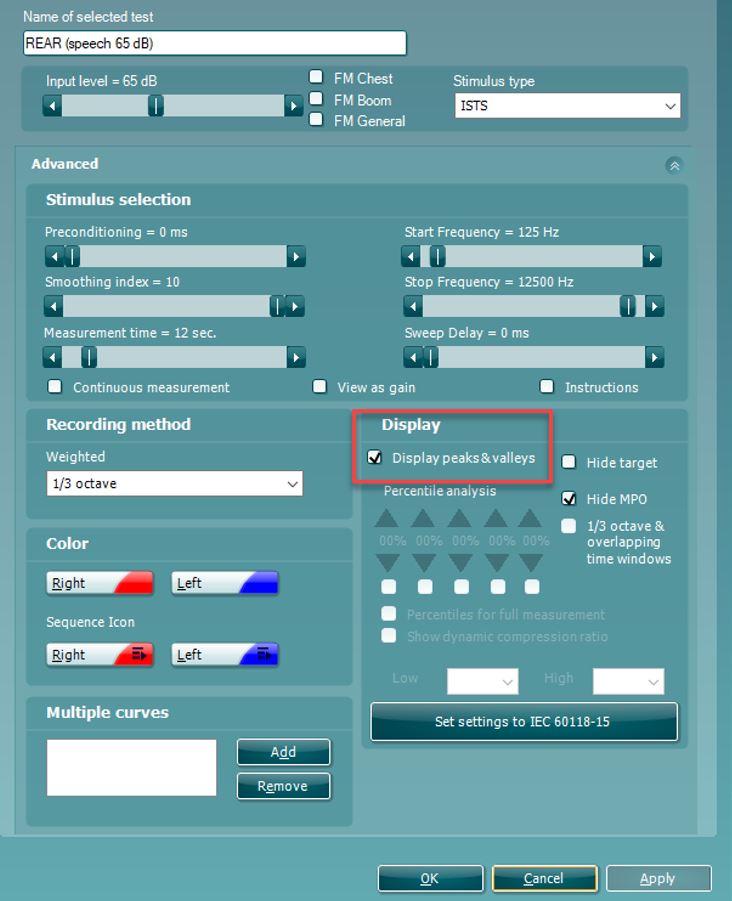
Figure 1: Enabling percentile analysis.

6. Perform Real Ear Measurements as per usual and fit your hearing aids to target:

  • Make sure to run the 'Calibrate for Open Fit' with the /ss/ stimuli along with the usual ones.
  • You need to measure an LTASS at 65 dB SPL as minimum (Figure 2).
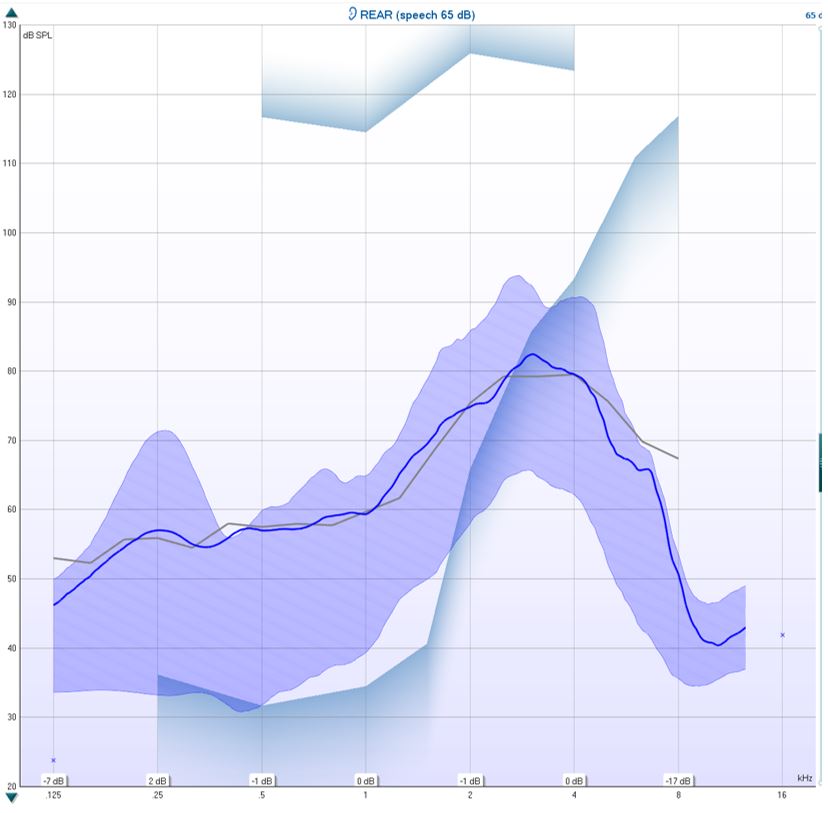
Figure 2: LTASS 65 dB measurement.

7. Determine the MAOF value. You determine your MAOF value from the point at which the LTASS crosses threshold to the point at which the peaks of speech crosses threshold (Figure 3).
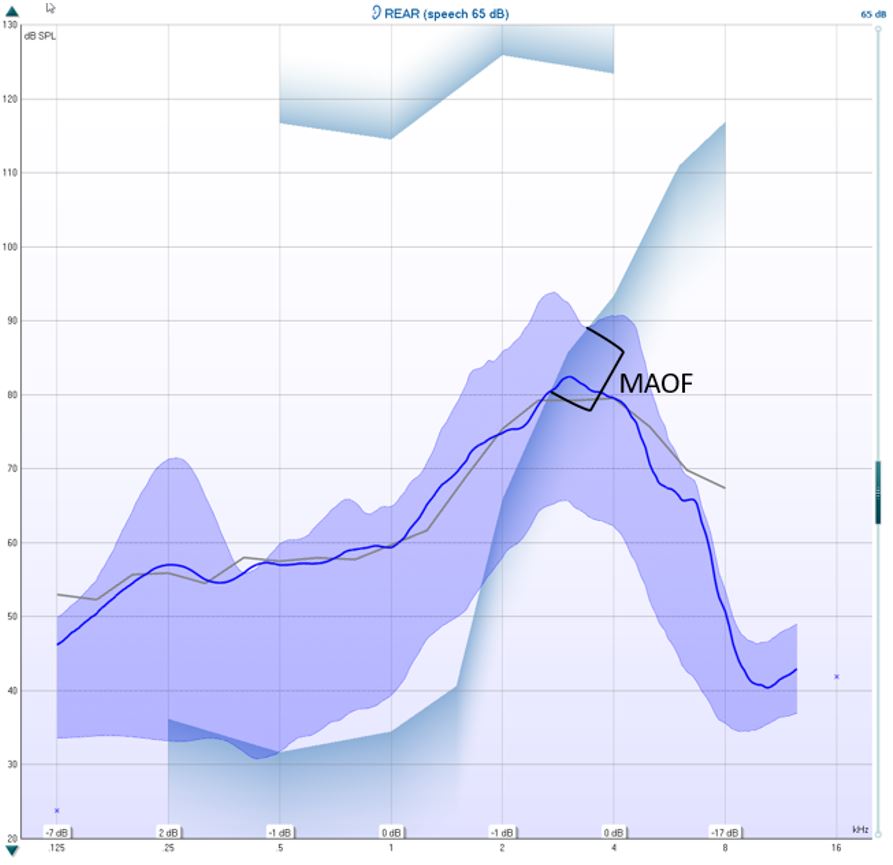
Figure 3: Determining the MAOF value.

In the example above, the MAOF has been marked, and your calculated MAOF value is at where the upper speech percentile crosses the threshold. In this example, it would be 3400 Hz (Figure 4).
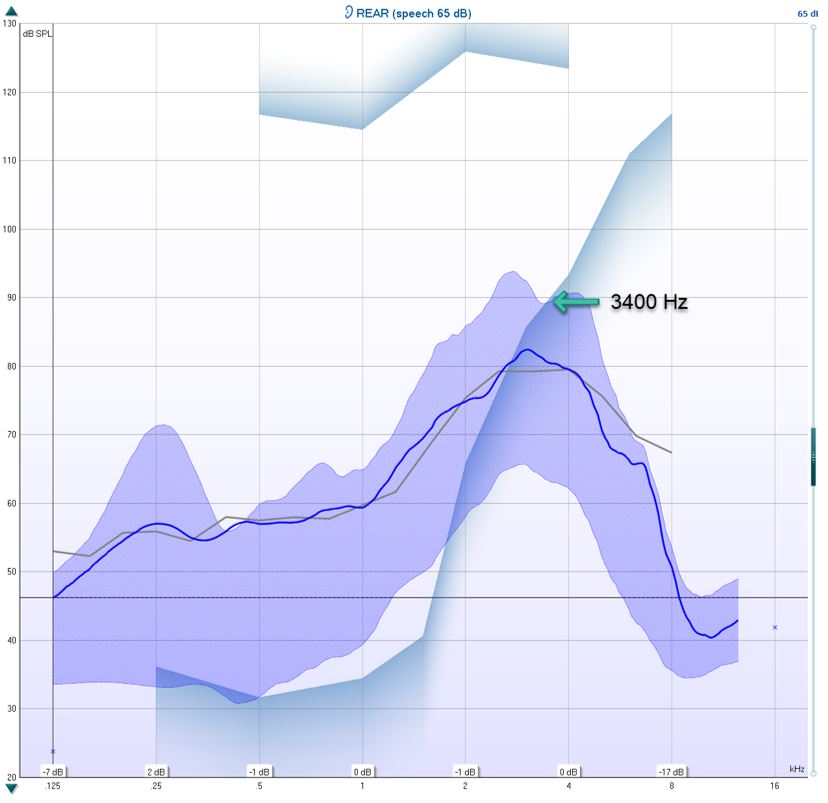
Figure 4: Calculated MAOF value.

8. Optional: hide target in the measurement settings (Figure 5).
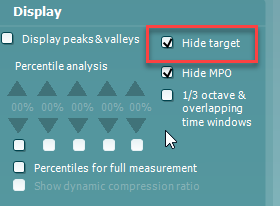
Figure 5: Hide target setting.

9. Measure the performance of the hearing aid with the frequency lowering feature off using the /ss/ stimulus (Figure 6).
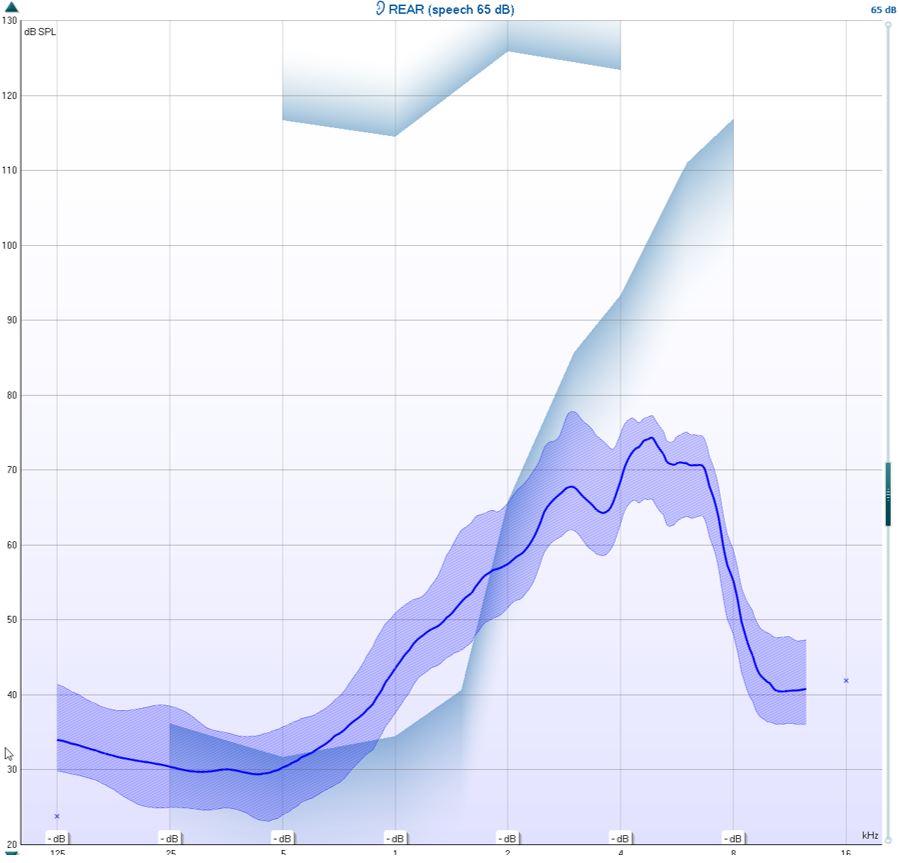
Figure 6: Hearing aid performance without frequency lowering.

10. Determine if the calibrated /ss/ stimulus is audible and falls within the MAOF range for an LTASS measured at 65 dB. If not, the candidacy criterion for frequency lowering has been met.

How to verify frequency lowering feature

1. Measure the performance of the hearing aids with frequency lowering feature on using the /SS/ stimulus (Figure 7).
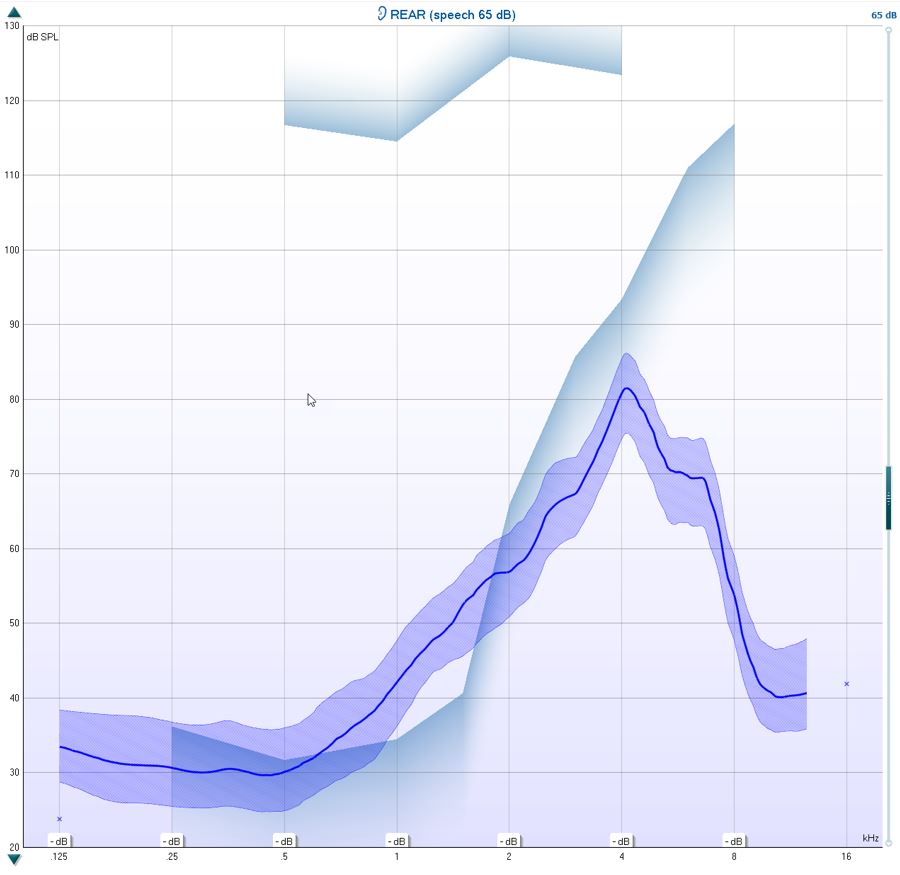
Figure 7: Hearing aid performance with frequency lowering.

2. Evaluate if it falls within the MAOF range at 65 dB SPL.

3. Fine-tune the frequency lowering so the /SS/ falls within the MAOF range (Figure 8).
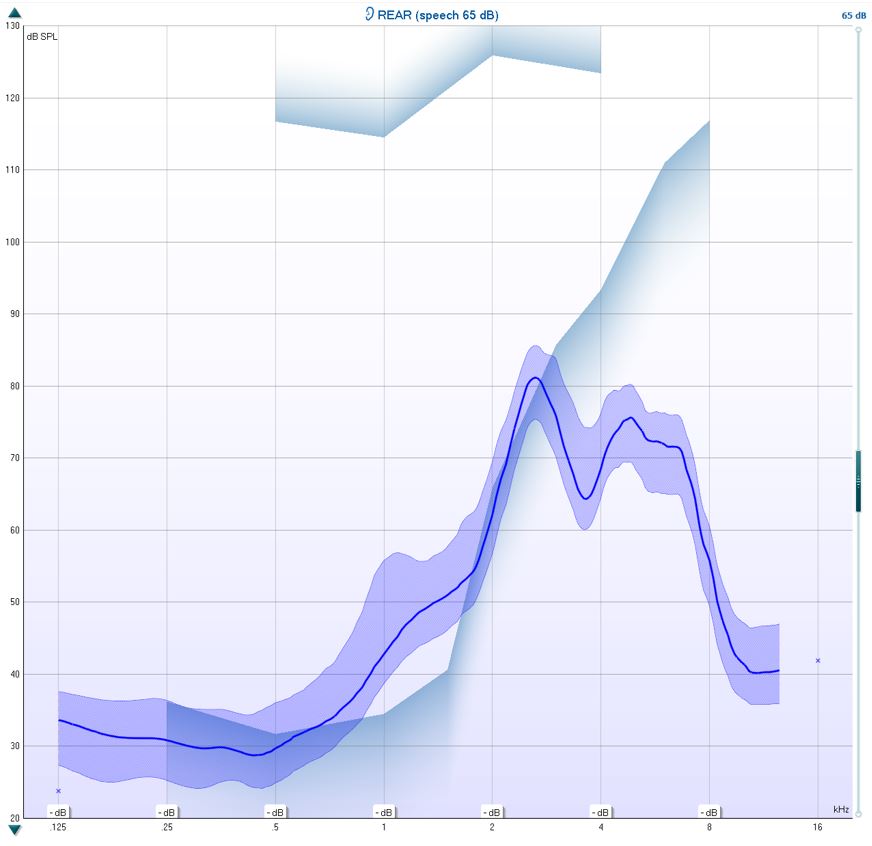
Figure 8: Fine-tuned frequency lowering.

4. You can choose to run the test with the /SH/ stimulus to check the patient's ability to differentiate between the /SS/ and the /SH/ stimuli.

5. It is also beneficial to run the /SS/ at 55 dB SPL to ensure the softer stimulation is audible.

Presenter

Interacoustics

Available Training

AC440 Protocol Setup

Learn how to set up protocols in the Affinity Compact's audiometry module.

Interacoustics2026-10-28

How to perform FM transparency verification

In this Affinity Compact quick guide, you'll learn how to perform FM transparency verification. Read more.

Interacoustics2026-10-28

BKB-SIN speech-in-noise test

In this quick guide, you will learn how to use the BKB-SIN speech-in-noise test provided with the Interacoustics Affinity Compact audiometer. Read more.

Interacoustics2026-10-28

Unboxing Affinity Compact

In this unboxing video, you'll see the various hardware included when purchasing the Affinity Compact from Interacoustics. Click here to watch the video.

Alan Thaastrup Mikkelsen2026-10-28

Performing an RECD Measurement

Learn how to perform coupler fittings with the Affinity Compact.

Dennis Mistry2026-10-28

How to Perform Real-Ear Measurements

Learn how to perform real-ear measurements with the Affinity Compact.

Dennis Mistry2026-10-28

Affinity Compact: Features and functions

This video provides an overview of the Affinity Compact's features and functions.

Dennis Mistry2026-10-28

Affinity Compact: A product introduction

This video provides an introduction to and overview of the Affinity Compact.

Interacoustics2026-10-28

How to Use Affinity Compact's Probe Placement Indicator

Learn how to use Affinity Compact's Probe Placement Indicator in this short, step-by-step guide. Read the guide here.

Rasna Kaur Mistry, BSc (Hons) Audiology2026-10-28

Customized Printout Setup

Learn how to customize printouts with the Affinity Compact.

Interacoustics2026-10-28

Real-Ear-to-Coupler Difference

Learn how to measure the real-ear-to-coupler difference (RECD) with the Affinity Compact.

Interacoustics2026-10-28

QuickSIN Test

Learn how to perform the quick speech in noise (QuickSIN) test with the Affinity Compact.

Interacoustics2026-10-28

TEN Test in AC440

Learn how to perform the threshold equalizing noise (TEN) test with the Affinity Compact.

Interacoustics2026-10-28

REM440 Protocol Setup

Learn how to set up protocols in the Affinity Compact's real-ear measurement module.

Interacoustics2026-10-28

Visible Speech Mapping

Learn how to perform visible speech mapping with the Affinity Compact.

Interacoustics2026-10-28

Speech in Quiet (SIQ) Test

Learn how to perform the speech in quiet (SIQ) test with the Affinity Compact.

Interacoustics2026-10-28

Looking for clinical training?

Are you looking for more advanced and clinical training?