Delta Values

By Interacoustics

What is the Delta Values feature?

When fitting hearing aids to independent target curves it can sometimes be difficult to assess how far your measurement curve is away from the target curve.

Therefore, we have developed the Delta values feature which enables the Affinity Suite to calculate the difference between your measurement curve and your target curve to make your fitting appointments more efficient. This has been implemented in a manner which preserves the exisiting view you are familiar with in the REM440 module.

Preparation

  1. Enter your REM module as you would normally.
  2. Connect probe tubes to the REM reference microphones.
  3. Click on the Tube Calibration button Tube calibration button, which looks like a triangle. and follow the instructions on the screen, this process ensures that the probe tube is made acoustically invisible - enabling an effective display of the actual gain achieved at the tympanic membrane by the hearing aid.
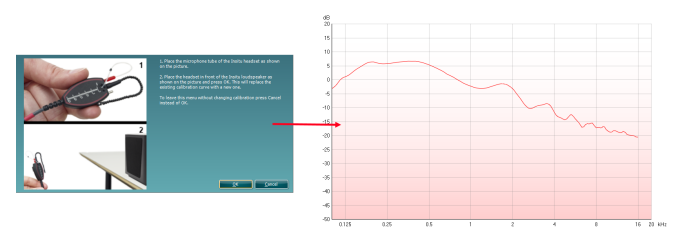
  4. Position the patient approximately 0.5 metres from the REM loudspeaker.
  5. Perform otoscopy to ensure the ear canal is clear.
  6. Place the REM tubes inside the patient's ears and aim to use a marker of roughly 28mm (female) and 30mm (male) on the probe tubes. This helps to get the open end of the tube in an optimum recording position (BSA, 2018).
  7. Choose the protocol you would normally use in your system and apply the relevant fitting algorithm settings.
  8. When you get to the measurements where you are fitting hearing aids you can enable the Delta function on the left panel via the following icon. Icon, which looks like a triangle.

Note: This feature can be defaulted on in your protocol settings.

Enabling this will show small values at the bottom of your graph which represent the difference between your measurement curve and the target at the standard octave frequencies. For example, when the measurement curve is below the target it will show in a negative value and when it is above it will show as positive. A correct target match would show as zero.
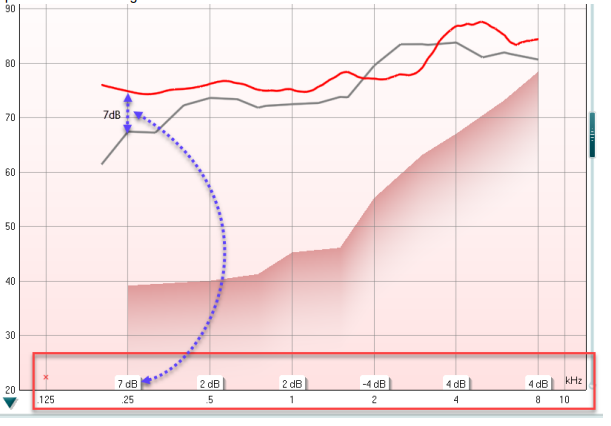
Graph with dB as a function of kHz. Two curves are plotted in the graph: a red measurement curve and a grey target curve. At 0.25 kHz, the delta value is 7 dB. At 0.5 kHz, the delta value is 2 dB. At 1 kHz, the delta value is 2 dB. At 2 kHz, the delta value is minus 4 dB. At 4 kHz, the delta value is 4 dB. At 8 kHz, the delta value is 4 dB.

A target curve must exist for you to be able to use the Delta values feature and the values shown will always correspond to the selected/active curve and its target.

Note: This feature can be applied for both REIG and REAR measurements.

Note: This feature works for both in-ear measurements and coupler fitting measurements.

Note: This feature is also available when performing Visible Speech Mapping measurements.

9. Complete your fitting session as you would normally according to your protocol.

References

BSA (2018). Guidance on the verification of hearing devices using probe microphone measurements. Reading, British Society of Audiology. Available online: http://www.thebsa.org.uk/wpcontent/uploads/2018/05/REMS-2018.pdf [Accessed: 02/05/2019 10:39].

BS ISO 12124 (2001). Acoustics: Procedures for the Measurement of real-ear acoustical characteristics of hearing aids. Geneva, International Standards Organisation.

Presenter

Interacoustics

Available Training

AC440 Protocol Setup

Learn how to set up protocols in the Affinity Compact's audiometry module.

Interacoustics2026-10-28

How to perform FM transparency verification

In this Affinity Compact quick guide, you'll learn how to perform FM transparency verification. Read more.

Interacoustics2026-10-28

How to perform frequency lowering verification

In this Affinity Compact quick guide, you'll learn how to determine if you should apply frequency lowering and how to verify the frequency lowering feature.

Interacoustics2026-10-28

BKB-SIN speech-in-noise test

In this quick guide, you will learn how to use the BKB-SIN speech-in-noise test provided with the Interacoustics Affinity Compact audiometer. Read more.

Interacoustics2026-10-28

Unboxing Affinity Compact

In this unboxing video, you'll see the various hardware included when purchasing the Affinity Compact from Interacoustics. Click here to watch the video.

Alan Thaastrup Mikkelsen2026-10-28

Performing an RECD Measurement

Learn how to perform coupler fittings with the Affinity Compact.

Dennis Mistry2026-10-28

How to Perform Real-Ear Measurements

Learn how to perform real-ear measurements with the Affinity Compact.

Dennis Mistry2026-10-28

Affinity Compact: Features and functions

This video provides an overview of the Affinity Compact's features and functions.

Dennis Mistry2026-10-28

Affinity Compact: A product introduction

This video provides an introduction to and overview of the Affinity Compact.

Interacoustics2026-10-28

How to Use Affinity Compact's Probe Placement Indicator

Learn how to use Affinity Compact's Probe Placement Indicator in this short, step-by-step guide. Read the guide here.

Rasna Kaur Mistry, BSc (Hons) Audiology2026-10-28

Customized Printout Setup

Learn how to customize printouts with the Affinity Compact.

Interacoustics2026-10-28

Real-Ear-to-Coupler Difference

Learn how to measure the real-ear-to-coupler difference (RECD) with the Affinity Compact.

Interacoustics2026-10-28

QuickSIN Test

Learn how to perform the quick speech in noise (QuickSIN) test with the Affinity Compact.

Interacoustics2026-10-28

TEN Test in AC440

Learn how to perform the threshold equalizing noise (TEN) test with the Affinity Compact.

Interacoustics2026-10-28

REM440 Protocol Setup

Learn how to set up protocols in the Affinity Compact's real-ear measurement module.

Interacoustics2026-10-28

Visible Speech Mapping

Learn how to perform visible speech mapping with the Affinity Compact.

Interacoustics2026-10-28

Looking for clinical training?

Are you looking for more advanced and clinical training?