Bayesian Weighting

By Interacoustics

What is Bayesian weighting?

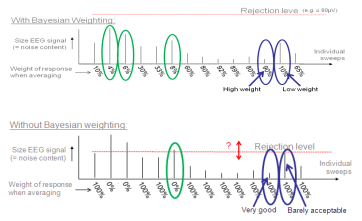
Bayesian weighting is a tool designed to assist the clinician when testing in less than optimal conditions. While giving sweeps with less noise a higher "score", sweeps with more noise are not given the same level of importance in the overall recording. Each sweep is analysed and not simply accepted or rejected as with traditional averaging but is given a unique signficance based on its level of noise. Bayesian weighting can be used in all typical ABR testing situations and will be effective when EEG levels vary during recording.

When can you use Bayesian weighting?

As Bayesian weighting does not change the response of a waveform, you may use it in all typical ABR recording situations.

Why use Bayesian weighting?

    • The optimum use of all data reduces test time.
    • More stable recordings, as residual noise will never suddenly rise (and a good waveform deteriorate) during recording, even if patient starts to be uneasy.
    • The difficulty of selecting the optimum rejection rate is reduced, as a softer rejection rate can be used without the noisier sweeps contaminating the more quiet sweeps.

When is Bayesian weighting less relevant?

1. If the patient does not have a fluctuating EEG during the session

Bayesian weighting weights noisy sweeps less and quiet sweeps more. In a situation where all sweeps are the same, they will be weighted equally. This is identical to normal averaging. Hence, there is no difference between recordings with and without Bayesian weighting.

2. If a very tough rejection level is set

In this case, all noisy sweeps are simply rejected for both Bayesian and non-Bayesian recordings. Only the most quiet sweeps are accepted, and you have a situation almost similar to above. With softer rejection criteria (e.g. 80μV) you would benefit from the contributions of the more noisy sweeps in your averaging thus arriving at your desired residual noise level in less time.

3. If you run long enough to get a low residual noise level

If two waveforms each have 40nV residual noise, then they will look equally clean. It does not matter whether you have used 1.000 or 10.000 sweeps to get there or what type of weighting is used. Weighting will simply get you there faster if the patient has fluctuating EEG during the session. It should be noted that two waveforms each with 40nV residual noise may exhibit minor variations in wave morphology due to e.g. the frequency distribution of the residual noise. This may differ with different test situations, and quiet patients tend to provide residual noise with more high frequency content and less low frequency content, which may look nicer to the eye. So keeping the patient as relaxed as possible is still recommended.

References

Elberling, C. & Wahlgreen (1985). Estimation of auditory brainstem response, ABR, by means of Bayesian interference. Scand. Audiol (14) 89-96.

Presenter

Interacoustics

Available Training

How to prepare the patient for ECochG testing

Learn how to prepare your patient for ECochG testing using the Eclipse. This video covers electrode montage, the test procedure, and more. Watch the video here.

Interacoustics2026-10-28

How to prepare the patient for threshold cortical testing

Learn how to set up and prepare your patient for threshold cortical testing. This video shows the recommended electrode montage and an alternative montage.

Interacoustics2026-10-28

How to prepare the patient for ABR and ASSR testing

Learn how to set up and prepare your patient for ABR and ASSR testing on the Eclipse. This video shows the electrode montage, the impedance check, and more.

Interacoustics2026-10-28

How to prepare the patient for cVEMP testing

Learn how to set up and prepare your patient for the cervical VEMP test procedure on the Eclipse. Includes patient instructions, electrode montage, and more.

Interacoustics2026-10-28

How to prepare the patient for oVEMP testing

Learn how to set up and prepare for the Ocular VEMP test procedure with the Eclipse. You will learn how to mount the electrodes and check impedances. Watch now.

Interacoustics2026-10-28

How to navigate the test screen

In this short, 2-minute video, you'll learn how to navigate the Eclipse software's test screen and access the most important options. Watch the video here.

Interacoustics2026-10-28

How to use the edit tab

Learn how to use the edit tab in the Interacoustics Eclipse software.

Interacoustics2026-10-28

How to use the top panel

Learn how to use the top panel in the Interacoustics Eclipse software.

Interacoustics2026-10-28

How to use the recording tab

Learn how to use the recording tab in the Interacoustics Eclipse software.

Interacoustics2026-10-28

How to use the latency tab

Learn how to use the latency tab in the Interacoustics Eclipse software.

Interacoustics2026-10-28

How to customize your ABR protocol

Learn how to customize your auditory brainstem response (ABR) protocol with the Interacoustics Eclipse.

Interacoustics2026-10-28

How to print a report

Learn how to print a report with the Interacoustics Eclipse.

Interacoustics2026-10-28

How to add a new patient in OtoAccess ® Database

Learn how to add a new patient in OtoAccess Database before testing with your Interacoustics Eclipse.

Interacoustics2026-10-28

How to make changes to a saved session

Learn how to make changes to a saved session with the Interacoustics Eclipse.

Interacoustics2026-10-28

How to mark ABR waveforms

Learn how to how to mark auditory brainstem response (ABR) waveforms with the Interacoustics Eclipse.

Interacoustics2026-10-28

Types of decibels in audiology

In this brief introduction to the decibel, you'll learn about its origin and the many suffixes appended to it in audiology. Read more about the decibel here.

Interacoustics2026-10-28

Looking for clinical training?

Are you looking for more advanced and clinical training?